How Much Does It Cost To Build a Wearable MVP? [2026 Breakdown]
June 2026
33 min
Product Development
Startup
A minimal fitness-band MVP starts around $43k. Do you know what exactly is included in this price, and what you'll get by the end? If not, read on to learn how the functionality affects the final cost.
"How much does it cost to build a wearable?" is a question we hear almost as often as "Can you do it for $20?" We know the answer to the first one well, because we have already built dozens of MVP devices, from simple bands to medtech products. To the second, we prefer to reply with a question of our own: "What do you actually want the device to do?"
That is where the conversation stops being about the cost of components and starts being about the price of functions. You can measure heart rate for $2 or for $20, but those are two very different user experiences: different data, different battery life, different integration complexity. And therefore, different costs. With a cheap or an expensive component base, you still end up with a fitness band, but its capabilities will not be the same.
Using a fictional fitness band as our example, we will walk through:
the different ways you can build each key function, from the cheapest approaches to the most expensive;
how much the component base might cost;
what a minimum viable product looks like at $43,000, $65,000-70,000 and $120,000.
As a bonus, we will cover how many hours can go into integrating the components and developing the firmware, as well as sourcing and building the enclosure.
N.B. The assumptions we use and our pricing sources are set out in the section "How this article works and what our recommendations are based on". It is worth reading that section before the main part: it answers the questions you are likely to have about why we chose the components we did.
1. Heart Rate and SpO₂ Measurement
Functional architecture of the MVP fitness tracker. Heart rate and SpO₂
Let us start with heart rate and blood oxygen measurement. For a fitness band, these are the headline metrics. How accurately the device reads your heart rate and oxygen level feeds directly into how much you trust it.
Measuring heart rate and SpO₂ is about far more than picking a sensor. The quality of the result depends on the optics, contact with the skin, how the sensor sits in the enclosure, signal-processing algorithms and noise filtering. The very same component can return acceptable data at rest and completely wrong figures the moment you move. You do not have to account for that whole list when building an MVP, though. It only really makes sense to do so if the band is intended for medical use.
Below are a few approaches worth considering for a fitness-band MVP. Disclaimer: this is not an exhaustive list of what is available on the market. We are talking about components we have either used ourselves or would consider practical options for an MVP.
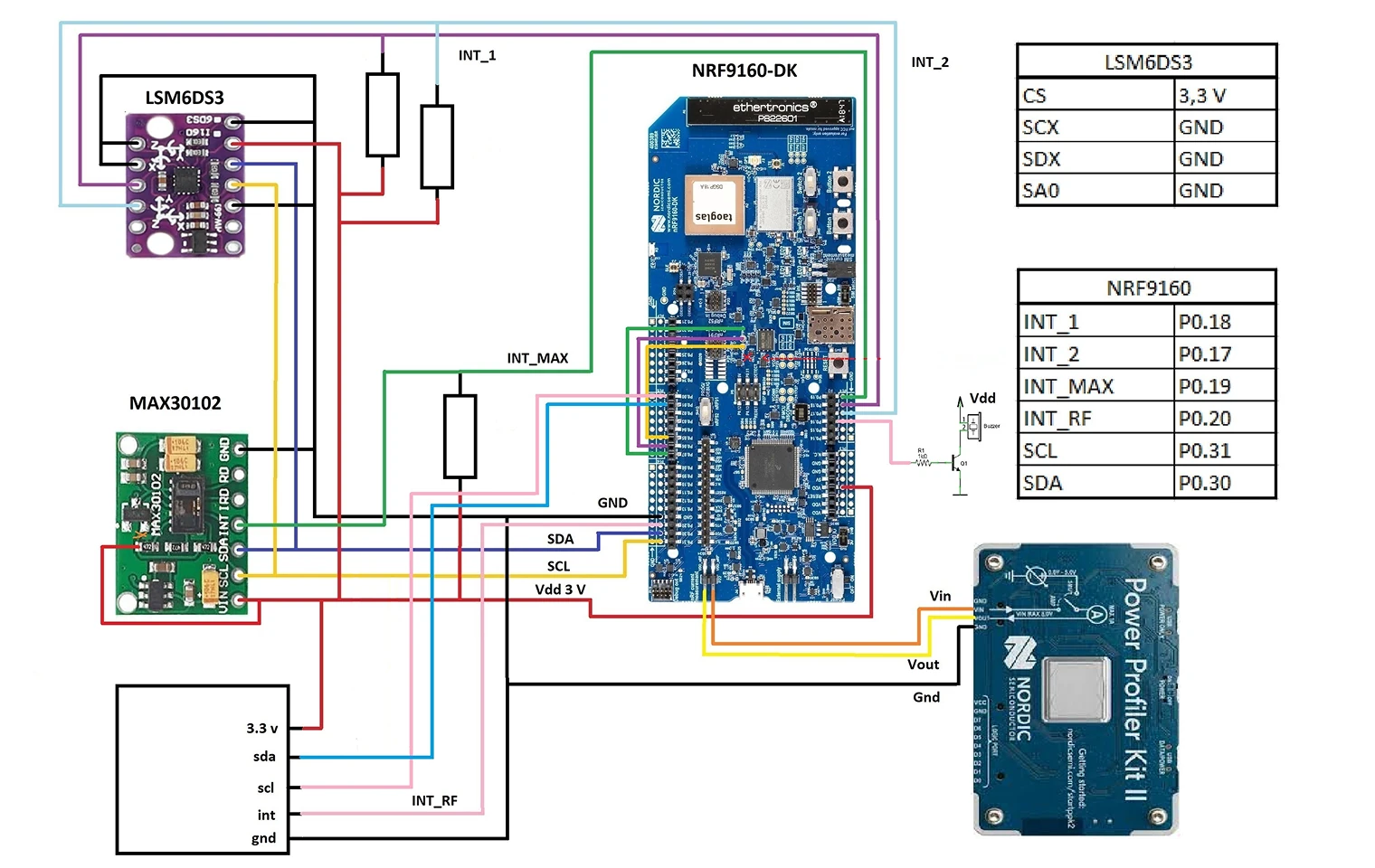
The MAX30102 covers the baseline scenario in the spec: continuous heart-rate measurement during walking, light running and moderate-intensity exercise, plus periodic heart-rate and SpO₂ readings in the background and at rest. It is not medical-grade accuracy, but for a fitness MVP it is usually enough: the MAX30102 lets you build a device that already looks like a real product rather than a lab mock-up.
That said, you need to be realistic: during high-intensity workouts (sprinting, CrossFit, lots of arm movement), with loose skin contact or a poorly fixed sensor, the signal gets noticeably noisy. In those scenarios, the MAX30102 gives less stable data, and the user notices.
Using the MAX30102 in a smart band
The MAXM86161 covers the same spec requirement as the MAX30102, but without the same caveats around intensity: the signal stays more stable when the user is sprinting or training hard with plenty of arm movement. There are two cases where this sensor earns its place: when the product is aimed at people who regularly train at high intensity, and when the MVP builds in extra analytics, such as recovery scoring, HRV (heart-rate variability) analysis or long-wear scenarios.
At that point, it is no longer just about demonstrating a function. It is about the device behaving reliably in real-world use. Even so, this sensor does not solve everything automatically: data quality still depends on the enclosure, skin contact and signal processing.
The AFE4950 is a slightly different approach. It is not a finished sensor, but the foundation for your own measurement system. In practice, that means the team separately selects the LEDs, photodiodes and filters, and tunes the signal processing around its own device.
This option is rarely chosen for a classic fitness-band MVP, because it noticeably increases development time and cost. But you do see it in projects that are designed from the start to move towards a medical device or professional sports equipment.
Heart rate and SpO₂ component cost
For a fitness-band MVP, both the MAX30102 and the MAXM86161 cover the heart-rate and SpO₂ spec, and the component base fits within $12-17 on the BOM. The difference is in data quality under intense load:
the MAX30102 is enough for a device aimed at moderately active users;
the MAXM86161 makes sense if stable heart-rate data, including during high-intensity workouts, matters to the product;
the AFE4950 is already about preparing for the next stage of the product's life.
2. Activity Detection and Step Counting
Functional architecture of the MVP fitness tracker. Activity detection and step counting
Step counting, active time and movement-type detection are among the core functions of a fitness band. Users expect the device to distinguish walking from rest correctly and not to count a wave of the hand as genuine activity.
As with heart rate, it is not only the sensor that matters here, but also the data processing, and that takes engineering hours (more on this later). The same accelerometer can deliver acceptable results in controlled conditions and a stream of false positives in real use: on public transport, while gesturing, or mid-workout.
The BMA456 is a balanced option that maps directly onto the spec. It already has activity-detection algorithms built in: the sensor can distinguish walking from rest and partly filter out noise. The baseline requirement from the introduction, "counts steps and distinguishes two states in the background: walking and rest", is met without additional algorithm development. The cost stays low, and the user experience is noticeably better than with basic accelerometers.
The LSM6DSOXTR goes beyond the minimum MVP spec. You do not need it for the "walking/rest" requirement, but it noticeably improves step-counting quality: its built-in gyroscope helps distinguish hand movements (gestures, lifting your wrist off a desk, picking things up) from real steps, which reduces false positives. Compared with the BMA456, it needs more sophisticated data processing, but it gives you more control over how the device interprets the user's movement. It is worth building in for two reasons: if minimising "phantom steps" from day one is important to the product, or if the roadmap already points towards detailed activity analysis.
Activity detection and step counting component cost
For a fitness-band MVP, the BMA456 covers the step-counting and activity-recognition spec, and the component base fits within a $2–7 BOM range. The LSM6DSOXTR sits beyond the spec. Teams choose it when step-counting quality in real wearing conditions becomes an important part of the user experience, or when the product is designed from the outset with room for more sophisticated motion analytics.
3. GPS Navigation
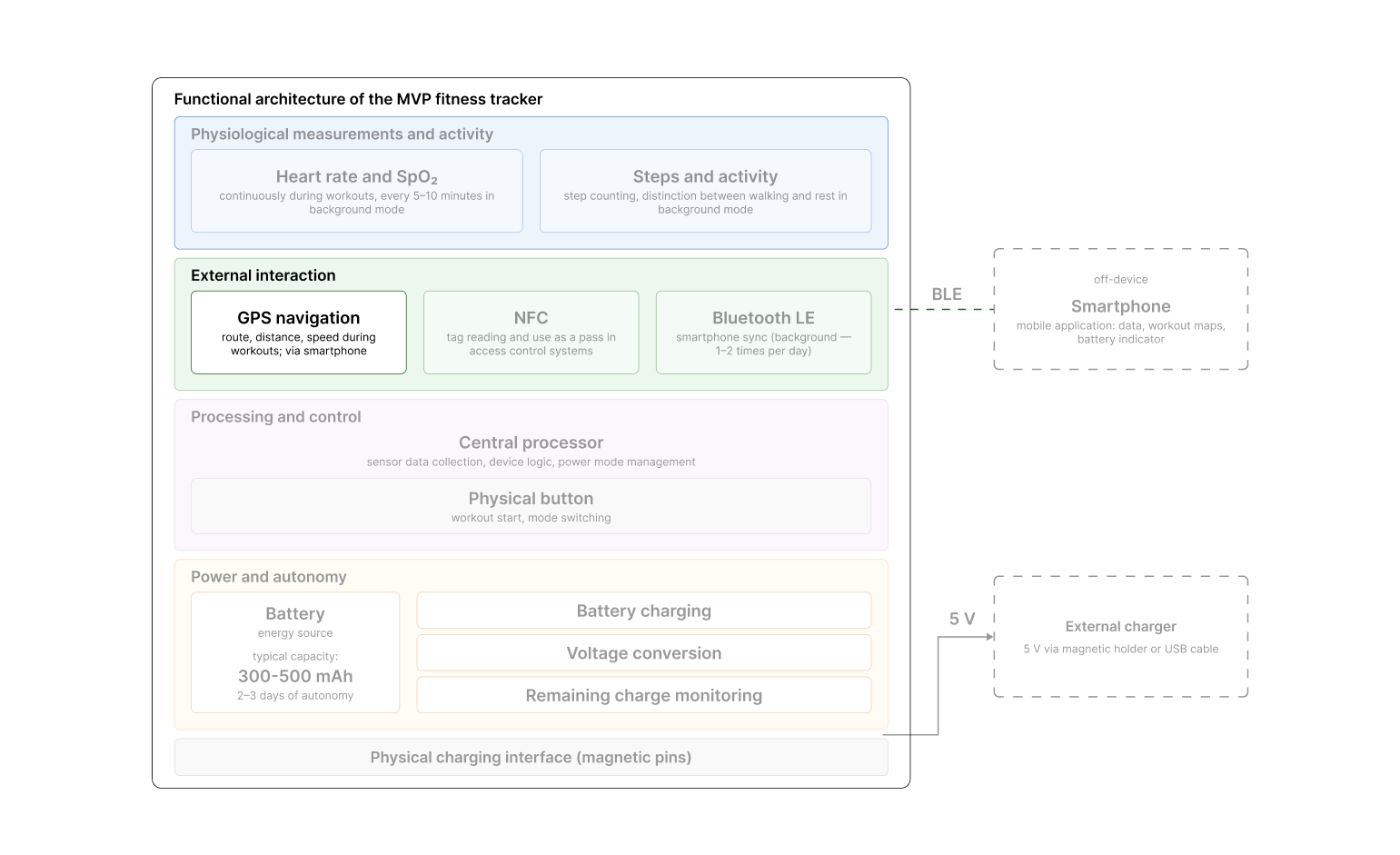
Functional architecture of the MVP fitness tracker. GPS navigation
“The MVP spec calls for recording the route, distance and speed during workouts, but the way we implement this function lives outside the device itself: the phone calculates the coordinates, while the band sends a Bluetooth signal to mark the start and end of a workout”. This approach is the most common one for fitness-band MVPs, and in our case it is a deliberate choice.
There are several reasons.
Power consumption. Even compact GPS modules draw in the region of 15–25 mA. For comparison: BLE in active mode draws 5–6 mA, while the MAX30102 in continuous mode draws 1–2 mA. For a band with a small battery, that means a noticeable hit to runtime. In continuous-workout mode, a device with active GPS can drain its battery in a few hours. Offload GPS to the phone and that line item disappears, while the claimed 2–3 days of battery life remain achievable without caveats.
Antenna placement. For a stable signal, the antenna needs enough room inside the enclosure, the right orientation and materials that do not shield it. In a compact band, that requirement complicates the layout: metal enclosure parts and tightly packed components degrade reception. Without a plastic window for the antenna, that can mean a 15–20 dB loss and may push the device outside FCC/CE limits on effective radiated power. Putting GPS on the phone removes that constraint entirely.
Cost. Doing it through the phone adds nothing to the BOM: the coordinates are calculated by a chip the user already has in their pocket. On top of that, a phone's GPS receiver almost always delivers more stable accuracy than a compact module in a band, thanks to its larger antenna and more powerful processor.
What the user gives up with this approach is device independence. Without on-device GPS, you cannot record a workout if you leave your phone at home. For our MVP, that is a trade-off we make with eyes open: the goal is to validate the user scenario, not to cover every possible user context.
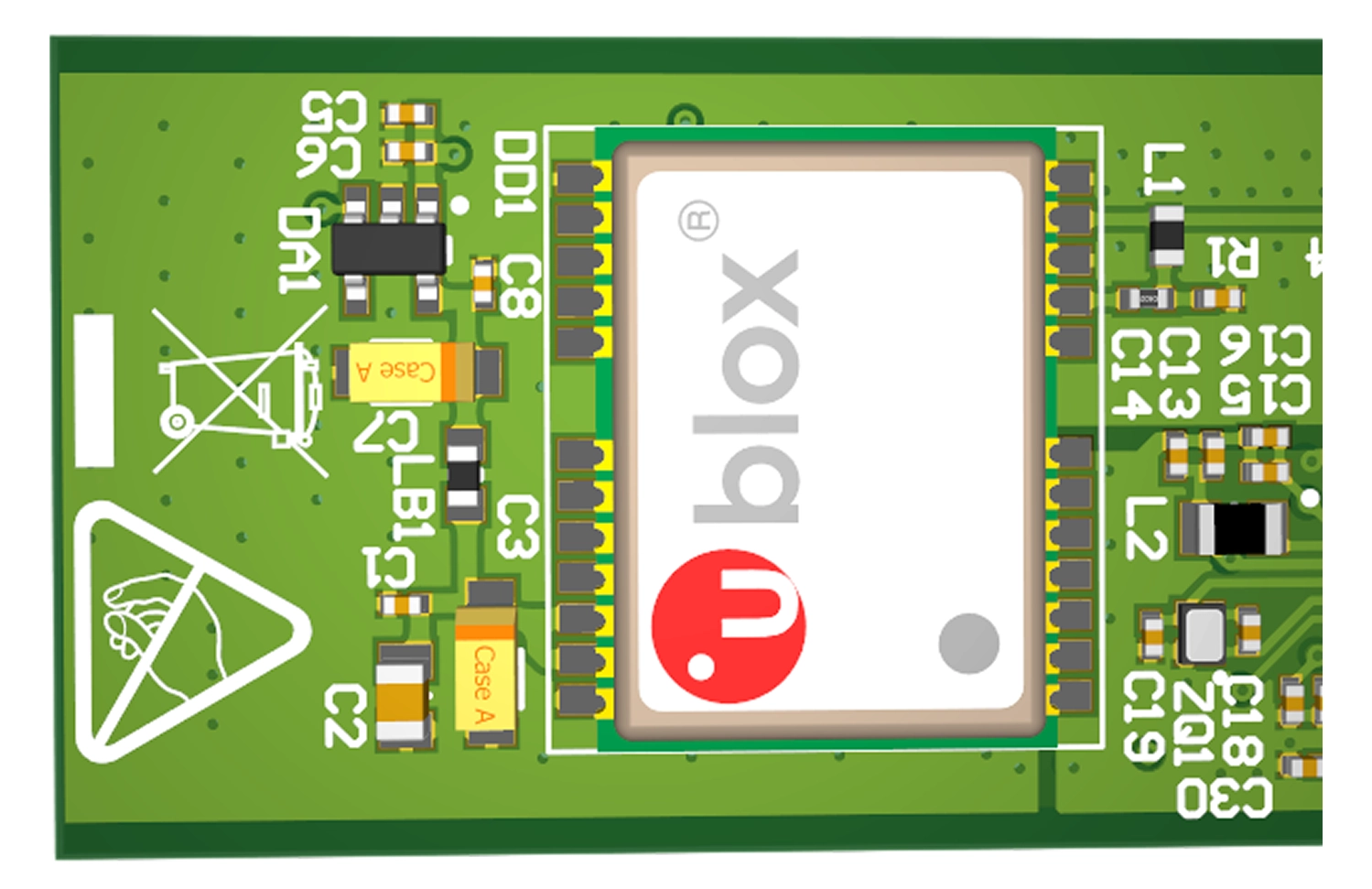
The u-blox M8N is an alternative path that is not part of our MVP spec, but is worth mentioning. If "train without your phone" is a value the product is built on, you integrate a dedicated GPS module into the band. Modules of the u-blox M8N's calibre deliver accuracy good enough not just for an MVP, but for a consumer fitness band, while staying compact enough to integrate. But there is a price to pay: the BOM grows by $25–34, battery life drops, the antenna needs room inside the enclosure, and metal enclosure parts start affecting reception. This path is worth considering for products aimed at long-distance runners and similar niches, where "head out without your phone" is a make-or-break user scenario.
Size of GPS compared to other PCB components
GPS navigation component cost
The GPS-navigation spec is covered by the phone-based approach, and the device's BOM for this function is $0. The on-device alternative (u-blox M8N) adds $25–34 to the BOM but is not used in our MVP: the "record a workout" scenario is covered via the phone, and device independence is not a critical requirement.
4. Contactless Interaction (NFC)
Functional architecture of the MVP fitness tracker. Contactless Interaction (NFC)
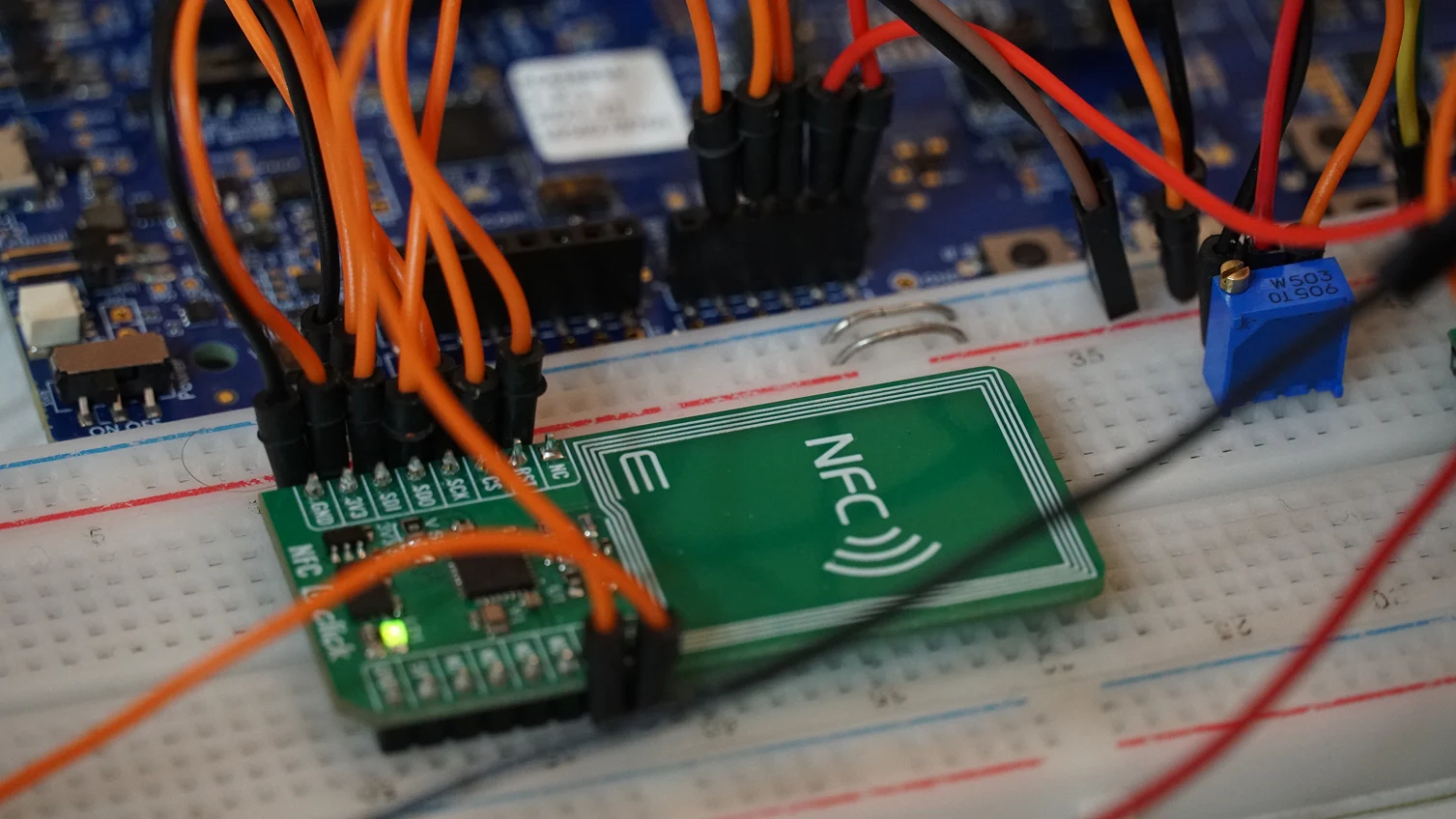
NFC acting as an external module for reading users' cards
NFC is a short-range, contactless data-exchange technology between devices. In a fitness band, it is used for two kinds of interaction:
with passive NFC tags (stickers, fobs, cards with an embedded identifier);
with active NFC readers (access-control terminals, scanners).
NFC acting as an external module for reading users' cards
In our MVP spec, NFC covers three scenarios.
Triggering actions by tapping a tag. The band reads the identifier from an NFC tag and starts a pre-set action. For example: tapping a tag at the gym entrance starts a workout on the device; tapping a tag on the bedside table logs a "going to sleep" event in the app. The tag itself stays passive. All the logic runs on the band and in the app.
Passing the user's identifier. The band sends its own unique ID to an external reader or to the mobile app. This is used to link the device to an account, mark attendance at a class, or register an event.
Working as an access pass. The band is used as an electronic key in existing access-control systems: gym, office, entry-phone. As far as the access system is concerned, the band is equivalent to a pass card.
Contactless payment is not built into the MVP spec. It is a fundamentally different class of problem in terms of device architecture, cost, timelines and certification requirements.
It is worth noting the difference between an active and a passive tag. For instance, the nRF52 NFC hardware block cannot generate a 13.56 MHz field, so it cannot work as an NFC reader. The chip supports only Card Emulation (ISO 14443 Type A). To poll tags, you need an external NFC controller. In that setup, the band emulates an NFC tag and an external terminal reads it.
Below are two approaches to implementing NFC in our band.
NFC built into the SoC covers all three of our spec scenarios. In the nRF series (Nordic) chips chosen as the device's central processor, the NFC controller is on the die. There is no need to add a separate module to the board: NFC is delivered by the SoC that is already in the band. The board does not grow and the enclosure design does not become more complicated.
The capabilities of built-in NFC are bounded by the user scenarios: working with tags, passing an identifier, acting as a pass. For payment operations, built-in NFC is not enough. Banking infrastructure requires a dedicated secure chip, which the SoC does not have.
NRF52810 in a compact agri tech system
NFC + Secure Element is the path for devices that support contactless payment (Apple Pay, Google Pay, banking infrastructure). On top of the NFC controller, you add a secure element: a dedicated security chip for safely storing payment data and performing cryptographic operations. To that, you include a separate antenna and room in the enclosure for both components. A typical example of a complete solution is the NXP PN80T.
The main costs arise not in the hardware, but in certification and software: integrating with payment systems, meeting security requirements, and passing the payment-infrastructure audit. These stages often take more time and resources than building the device itself. That is why this path is rarely built in at the MVP stage.
NFC component cost
The NFC spec in our MVP is covered by NFC built into the SoC, and the BOM for this function comes in at up to $2. In practice, it is part of the cost of the central processor; there is no separate line item. The contactless-payment alternative adds $20 or more to the BOM at runs of 1,000+ units and multiplies development cost through certification and integration with payment systems. We do not use this path in our MVP and treat it as a separate product track.
5. Power and Battery Life
Functional architecture of the MVP fitness tracker. Power and battery life
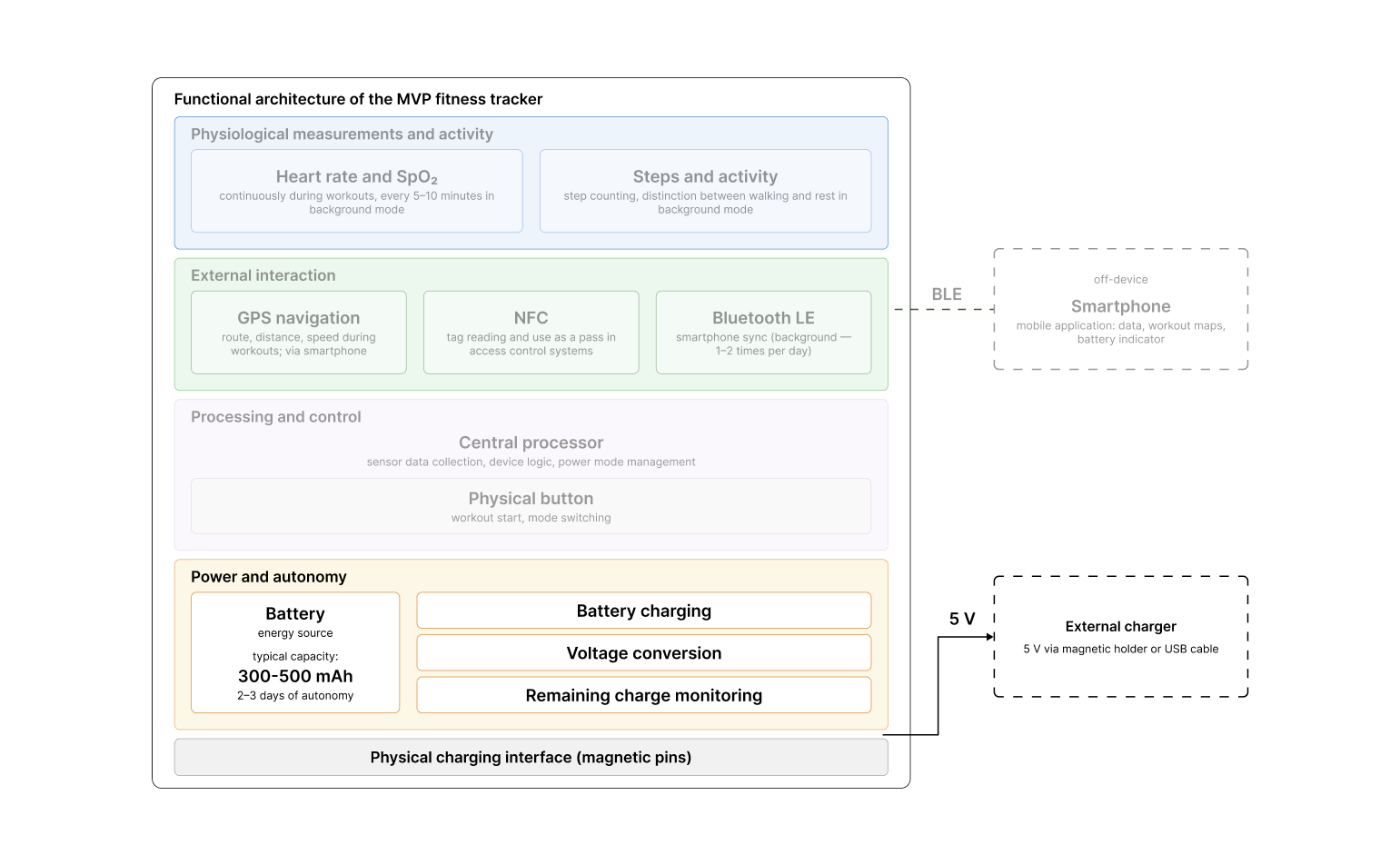
A fitness band's power subsystem solves several independent jobs: charging the battery from an external source, converting the battery voltage into stable rails for the chips, monitoring the remaining charge, and providing the physical charging interface. The subsystem's cost is the sum of the decisions on each of these, not a single "power controller".
What follows is each job in turn: the best option for an MVP, the grounds for replacing it, and the BOM cost.
Charge Controller
The charge controller sits between the external power source and the Li-Po battery and manages the charging profile: constant current up to a set voltage, then constant voltage until fully charged. It is also responsible for protection against overvoltage, overheating and overcurrent.
The best option for a basic MVP is the MCP73831. It needs minimal external circuitry and is suited to 150–200 mAh Li-Po batteries and devices without peak loads: heart rate, steps, BLE, with no GPS or screen.
Moving up to the BQ24074 is justified in one scenario: if the device has a power path, meaning it can run from USB power while charging the battery, or if it has higher load currents. The MCP73831 does not support that; the BQ24074 does. In every other case, the difference in functionality is overkill.
In BOM terms: the MCP73831 is $0.80 per IC; the BQ24074 is $2.60 per IC. The controller itself is a small share of the subsystem's BOM, but it is the part that decides whether the device degrades its battery after six months of charging.
Voltage Conversion: DC-DC and LDO
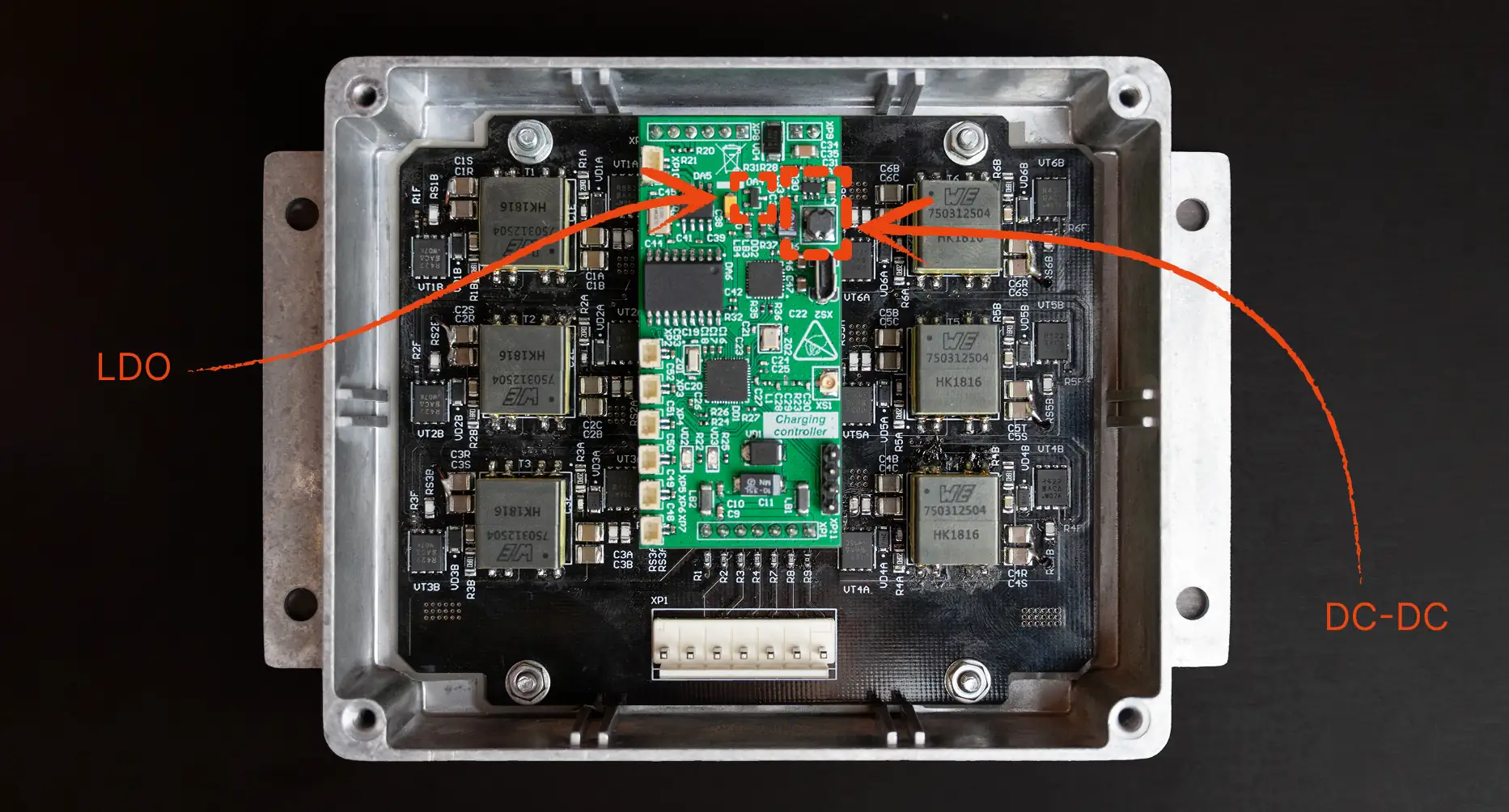
Li-Po voltage drifts between 3.0 and 4.2 V depending on charge level. The chips inside the device need a stable supply, typically 1.8 V for the sensors and 3.0–3.3 V for the SoC. This is handled by separate components: LDOs and DC-DC converters. They are not alternatives. A typical board uses both.
An LDO is a linear regulator. It is simple, generates no RF interference and needs minimal circuitry. Its efficiency is low: the difference between input and output voltage is dissipated as heat. It is used on low-draw nodes that need a clean supply, such as the PPG sensor, the accelerometer and MCU circuits in sleep mode.
A DC-DC converter is a switching device, typically 85–95% efficient. It needs an external inductor and filtering capacitors, and with careless routing it can inject noise into the RF section. It is used on high-draw nodes: the SoC under load, the screen, the transmitter.
DC-DC and LDO sizes shown
A typical MVP band has 2–3 power rails: one or two LDOs for the low-power nodes and one DC-DC converter for the main consumers. The exact configuration is set by the mix of components.
In BOM terms: one LDO is $2–3 per IC; one DC-DC converter is about the same, plus the external inductor and capacitors (up to $0.20). Across the subsystem, that is $6–9 in total. It is a line item people usually do not look at when costing a device, yet it is one of the main factors that determine power-system efficiency.
Charge Monitoring
The MVP spec calls for an accurate charge indicator in the mobile app to ±3%, with an estimate of remaining runtime. That requirement directly dictates the component: a dedicated fuel-gauge IC, such as the MAX17048 or the BQ27441. The principle is coulomb counting: tracking the real charge going into and out of the battery. Accuracy on remaining charge is ±1–3%, which fits the spec.
The alternative is measuring the battery voltage through the microcontroller's ADC. No separate chip is needed; a resistive divider does the job. But Li-Po voltage correlates poorly with real capacity: at 3.8 V, the charge could be anywhere from 40 to 60%. This approach cannot hit the spec's ±3%, so it is only suitable for demo prototypes.
In BOM terms: a fuel-gauge IC (MAX17048, BQ27441) is $3.40 per IC. For an MVP that is going out to users, there is no real alternative. Without it, the charge-indicator accuracy spec is simply not met.
PMIC: The Integrated Solution
When a device has several power rails and needs a fuel gauge, building the subsystem from discrete chips stops being worthwhile: 5–7 packages appear on the board for the power system alone, dozens of traces run between them, and every extra solder joint is a potential point of failure. For a compact wearable, that matters both for space and reliability.
Our MVP power subsystem needs to cover several rails (for the SoC and the sensors), an accurate fuel gauge (a spec requirement) and a charge controller. That is already three or four packages plus circuitry. In cases like this, the best option is a PMIC (Power Management IC). It is a single chip that combines a charge controller, several voltage converters and a battery-monitoring system in one package. Three of the subsystem's four jobs, charging, voltage conversion and charge monitoring, are covered by one chip, freeing up board space and reducing the number of solder joints.
A typical example is the MAX77650 from Analog Devices.
The downside is integration complexity. A PMIC does not work out of the box: once it is on the board, it has to be configured over I²C, including output voltages, charge currents, power-saving modes and how the system reacts to events. That adds work for the electronics engineer and the firmware engineer at bring-up.
In BOM terms: the MAX77650 is $7.30 per IC. For our MVP, it is the best option on both cost and layout: building the same functionality from discrete parts (MCP73831 + 2 LDOs + 1 DC-DC + fuel gauge) costs $10–13 on the BOM and takes up noticeably more board space.
Charging Interface
The best option for an MVP is magnetic pins: POGO contacts with magnetic alignment. The upsides are simple integration into the enclosure, reliable sealing and an intuitive user experience. It is the industry standard for compact wearables at the MVP stage.
A direct USB connector is hardly ever designed into a band: its size and the difficulty of sealing it make it a poor bet. Wireless charging is implemented as a separate subsystem: receiver coil, receiver chip (BQ51013, P9221 and similar parts), matching circuit and protection. It is rarely used at the MVP stage: it complicates the layout, grows the BOM and demands thermal management, without covering any critical user scenario.
In BOM terms: magnetic pins are up to$3 on the BOM (contacts plus magnets in the enclosure and the cable). Wireless charging is up to $10 on the BOM (receiver coil, receiver chip, matching circuit) and requires a more complex layout. For an MVP, magnetic pins are the right choice.
6. Bluetooth and the Central Processor (SoC)
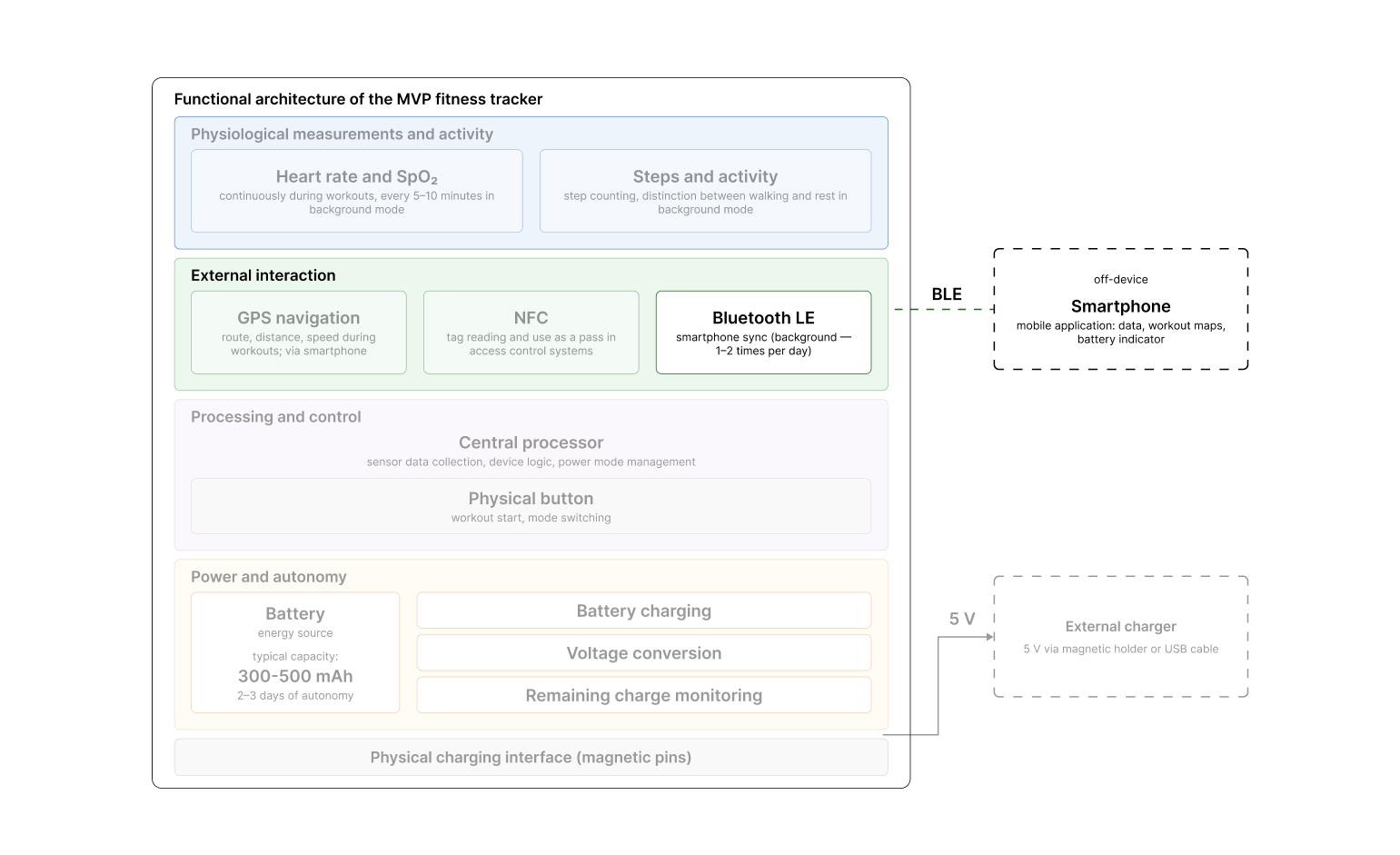
Functional architecture of the MVP fitness tracker. Bluetooth and the central processor (SoC)
The processor and Bluetooth are the heart of a fitness band. The SoC is responsible for collecting data from the sensors, processing it, running NFC, syncing with the mobile app and managing power modes. The same component directly affects the device's power consumption.
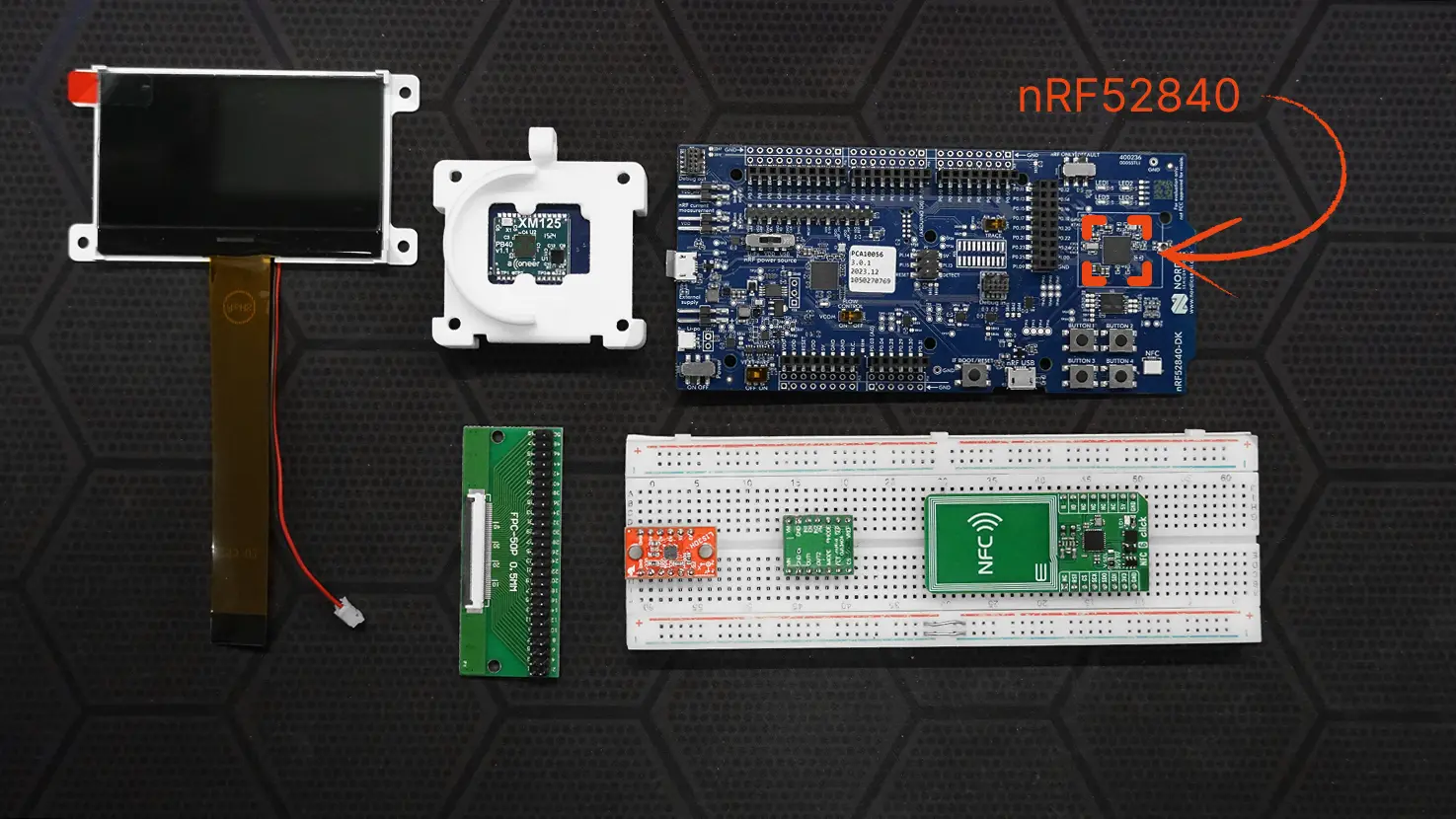
Fitness-band MVPs almost always use an SoC with built-in Bluetooth Low Energy (BLE). That means you do not have to add a separate Bluetooth module, you save space inside the enclosure, and you lower power consumption. In practice, fitness bands most often use Nordic's line, especially the nRF52832 and the nRF52840.
nRF52840 in a sports tech
The MVP spec does not ask much of the SoC: background work with the sensors (PPG, accelerometer), storing metrics between syncs, sending data to the mobile app over BLE once or twice a day, and supporting NFC for the user scenarios. GPS is offloaded to the phone, there is no screen, and there is no advanced local signal processing. This is exactly the kind of load the nRF52832 was designed for.
Below are a few approaches worth considering for a fitness-band MVP.
The nRF52832 covers our spec without question. The chip is enough to collect data from the PPG sensor and the accelerometer, run background measurements, sync with the app periodically and handle NFC. Its main strength is the balance of power consumption, cost and size: with a 300–500 mAh battery and the load set by the spec, the device meets the battery-life requirement with room to spare.
The nRF52840 makes sense to build in if the product is meant from the start to go beyond our spec. The specific triggers are more memory for storing data between infrequent syncs (a week of standalone operation without a phone connection, for example), an on-device USB interface, cryptographic operations for secure data transfer, or heavier local signal processing. The chip gives you more resources and a more flexible architecture, but moving to it does not just mean a more expensive SoC. A more powerful chip increases power consumption, and at the same battery capacity, battery life drops. In a compact wearable, that often matters more than the price difference between the chips themselves.
Bluetooth and the central processor (SoC) component cost
The Bluetooth and central-processor spec in our MVP is covered by the nRF52832, and the component base fits within $4 on the BOM. The nRF52840 ($4–6) sits beyond the spec and makes sense if you are planning functionality that needs more chip resources: long-term standalone data storage, a USB interface, or more complex local signal processing.
Enclosure and PCB Development
The cost of a new device's MVP also includes the cost of development. Engineers choose the optimal component base, decide which enclosure to use (off-the-shelf or custom), and work out how to handle the strap, water resistance and the logic that ties the electronics together.
On the mechanical side, a fitness band usually involves five jobs: the enclosure, the strap, the sensor windows, the charging interface and the sealing.
Enclosure
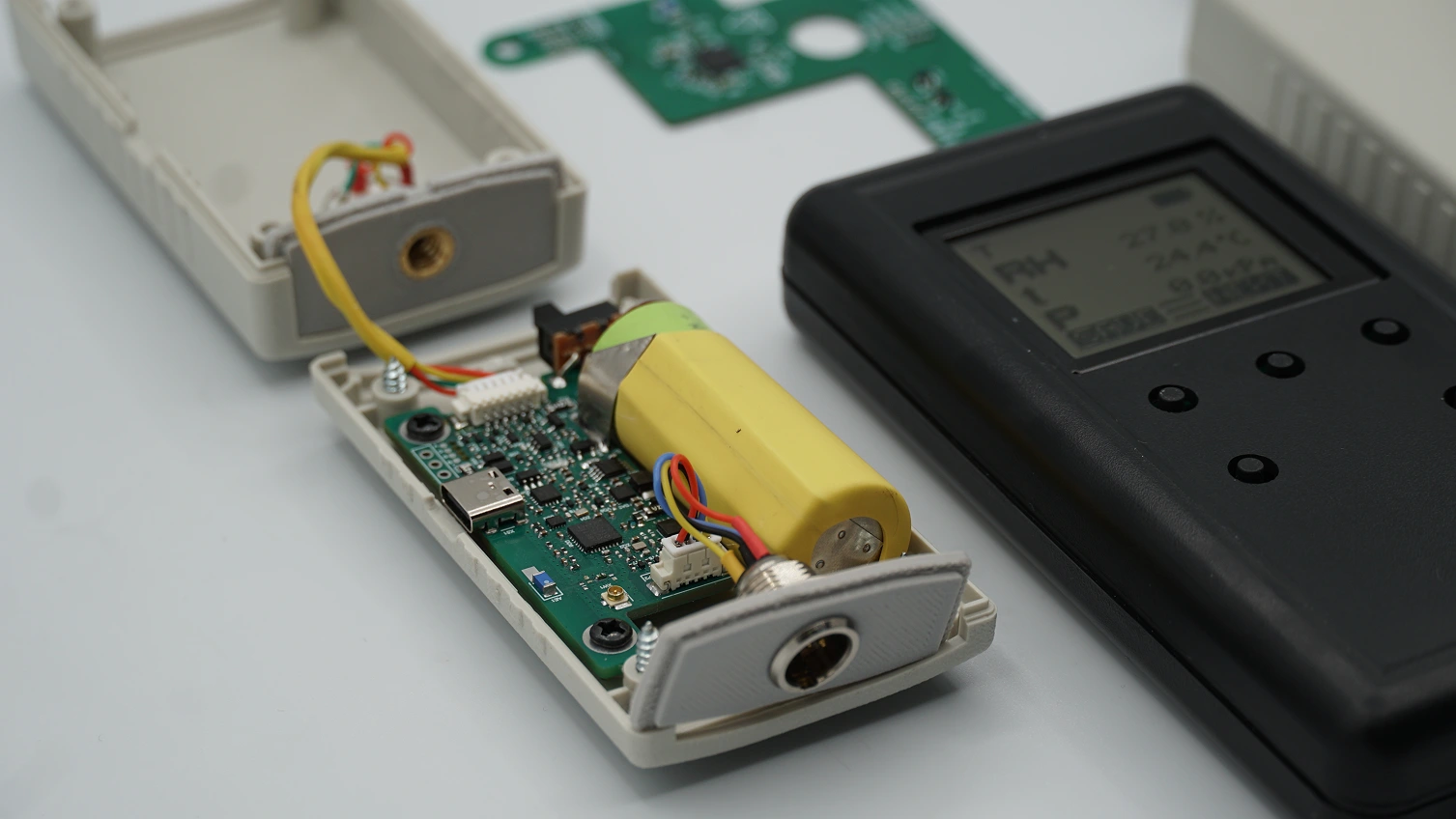
One of our portfolio’s compact enclosures
The enclosure decides how snugly the PPG sensor sits against the skin (and therefore the signal quality), how much the device weighs on the wrist, whether it survives a workout in the rain, and how comfortable it is to wear all day. So miniaturisation is the key requirement, but far from the only one.
Because the form factor of electronic wearables is now well established, there is a broad choice of off-the-shelf enclosures on the market in the right size, with a suitable IP rating and room for an antenna. That makes the MVP stage easier, but it does not remove the engineering work. An off-the-shelf enclosure rarely fits as-is.
If the product owner has a development team, there are usually three ways to handle the enclosure:
pick an off-the-shelf one that needs no changes;
pick one for modification;
design a custom enclosure from scratch.
Which of these suits you is a topic for another article (P.S. the factors behind choosing an enclosure are covered in detail in this article). Here, we will talk about what each option costs.
Finding an off-the-shelf enclosure means engineering hours, but an engineer will find the right one far faster than you will. A task like this takes from 4 to 18 hours. If your contractor's rate is $100 an hour, multiply by the rough number of hours and you have your figure. The enclosure itself costs $10–25 at a small run (up to 100 units); at runs of 1,000+, the price drops to $5–10. The off-the-shelf solution itself might run to a nominal $6 for small batches (up to 200 units), but the question then becomes whether you will need to modify it for the electronics, and whether you will want to at all.
Modifications are needed fairly often. You want a metal enclosure, but the antenna has to sit inside, so you either cut a non-conductive window into the metal or combine metal with a plastic insert. The PPG sensor has to sit flush against the skin, but the off-the-shelf enclosure was often designed for a different board, and the sensor window ends up misaligned. The button needs to be on the face for the use case, but on the off-the-shelf enclosure it is on the side, so you move mounting points and adapt the board fixings to the new layout. Modifying an enclosure for a device like this takes from 16 to 70 hours. At the MVP stage, the modifications are usually standard, and the odds of the hours reaching the upper end of the range are low. They rise as the technology readiness level goes up.
Developing a custom miniature enclosure takes from 150 to 350 hours. Custom design is needed in two cases: when the device's look is its distinguishing feature, and when the layout requirements (non-standard sensor placement or unusual proportions, for example) are not met by any off-the-shelf solution.
The enclosure material is a separate line item. Plastic (ABS, polycarbonate, ASA) is the cheapest, most convenient option: it does not shield the antenna, it is easy to work with, and at a mid-size run it gives a per-part cost of up to about $4 (injection moulding). Aluminium and stainless steel make the device feel more premium, but they make the part 3–5 times more expensive and immediately create an antenna problem: you either move the antenna into a plastic insert or design the metal as part of the antenna, which complicates the engineering significantly. At the MVP stage, the usual choice is plastic or a hybrid: a plastic base with metal decorative elements.
A word on the DIY route. Sometimes, a founder without an engineering team tries to handle the mechanics themselves, with prompts from an AI assistant. On paper, it works: AI can help draft the enclosure requirements and generate a list of potential suppliers. In practice, this path almost always produces a few failed iterations. Suppliers do not ship what they promised, the sensor window ends up in the wrong place, or the board will not seat properly. The $1,000–2,000 saved on an engineer turns into 1–2 months of lost time. If you go this way, budget for 2–3 iterations.
Strap
For a fitness band, the strap is half the perceived product, and at the MVP stage it is often underrated. There are three questions to settle here: the material, how it attaches to the case, and the type of clasp.
On material, the most common MVP choice is TPU or silicone: cheap to buy in ($1–3 per strap at mid-size runs), hypoallergenic, and able to survive sweat and water. Nylon "sport" straps are slightly more expensive ($3–6 at mid-size runs). Leather and straps with metal elements move into premium territory ($8–20 at mid-size runs), but for an MVP they are almost always overkill.
On attachment to the case, the choice is between a standard interface (spring bars, 18 or 20 mm) and a proprietary one. The standard lets the user swap the strap themselves and lowers cost; at the MVP stage, that is almost always the right call. A proprietary mount only makes sense if it carries a functional load, such as charging contacts in the strap itself. Otherwise, it just makes development more expensive.
The clasp: the classic "pin in a hole" is the cheapest option; magnetic and folding clasps add $2–5 to the cost of an individual strap.
With a standard mount, the strap takes few engineering hours: 10–20 to select and fit. If the strap is designed as part of the device, with integrated sensors or contacts, for example, that becomes a separate development task of 80–200 hours.
Sensor Windows and Charging Interface
The PPG sensor needs an optical window, usually a clear plastic or glass insert flush with the back of the enclosure. The window has to sit snugly against the skin, resist scratches and avoid fogging. At the MVP stage, the usual choice is polycarbonate inserts (the lowest BOM cost), and less often mineral glass. The engineering work here is to seat the window so the enclosure does not distort the sensor's signal, and to keep the joint watertight.
The charging interface is a separate mechanical decision. Magnetic pins are the most practical option for an MVP: simple to implement, with little impact on the layout. Wireless charging needs room for a coil in the enclosure and often comes with thermal constraints. A direct USB connector is hardly ever designed into a band: it is bulky and, if it is not physically protected, lets water into the device. That would leave the user having to check the connector for water before every charge.
Sealing (IP Rating)
The IP rating is the one item that can suddenly make an MVP's mechanics more expensive. Between IP54 (splash protection) and IP68 (submersion), there is a gulf in both cost and complexity.
IP54–IP67 covers most fitness scenarios: sweat during a workout, the shower, the rain. It is achieved with seals and bonded joints; on an MVP, it adds 20–40 engineering hours and a small amount of material to the BOM ($1–2). IP68 (swimming) needs more serious seals, pressure testing and dedicated solutions for the microphone and buttons (if there are any). That means an extra 40–80 engineering hours and a more expensive component base ($10 more). If the device is going to be used in water, you need to think about it from the very start of enclosure design, not at the final stage. Otherwise, you will be reworking it.
Now to the electronics.
This work is usually split into several stages:
schematic design;
board layout;
firmware development;
integration;
debugging.
At each stage, the engineer makes dozens of decisions that affect the final cost, dimensions and behaviour of the device.
Schematic design defines which components are used and exactly how they connect. At the MVP stage for a fitness band, that covers the support circuitry for the SoC, the sensors, the power controller and the charging interface. For a typical device with heart rate, an accelerometer, BLE and a basic power system, this work takes from 40 to 50 hours. Add GPS, NFC and more complex power management, and it grows to 80 hours. This is where decisions get baked in that are hard to change later without re-laying the board, such as separating power lines for the analogue sensors or isolating the RF circuits.
PCB design for a wearable is markedly different from designing boards for, say, a smart home device or industrial electronics. You have to fit everything into a very tight space, route the antenna correctly (BLE and/or GPS), account for the RF zones, route the PPG sensor's analogue signals cleanly, and plan the thermal behaviour. At the MVP stage, a fitness band's board almost always ends up 4-layer or 6-layer. In some cases, the enclosure choice may dictate a flex or rigid-flex board. Its type will affect manufacturing cost. Basic routing without complex RF takes from 60 to 120 hours. If you need to route an integrated antenna, the PPG analogue channel and power for several load modes, it rises to 120–250 hours. Additional time goes into simulating the antenna and tuning how it works inside the enclosure.
Firmware is the most labour-intensive part. It is responsible for working with the sensors, communication over BLE, signal processing, power management and the user scenarios. For a basic MVP with steps, heart rate and a once- or twice-daily sync to the phone, you will need from 200 to 400 hours. Add GPS, NFC, a screen and more complex signal-processing logic (PPG filtering, activity classification, custom pedometer algorithms), and it grows to 400–800 hours and beyond. Power optimisation is a task in its own right: on a compact band, it is the firmware that decides whether the device lasts two days or five.
Integration and debugging is the stage where everything comes together. The board goes into the enclosure, the firmware is tested on the real geometry, and the thermal behaviour, power draw, antenna and sensor behaviour are all checked. This also covers debugging the problems that only show up in the assembled device, such as the effect of the enclosure material and skin pressure on the PPG signal, or antenna characteristics being distorted by the proximity of the battery. This stage usually takes from 80 to 200 hours and depends first and foremost on the number of prototype iterations.
An important point: this is the minimum needed to get a working device for user testing. It does not include refinement for mass production, certification, or, least of all, the regulatory procedures for medtech. But this is exactly the stage most often underestimated when people look only at a BOM of $20–40 and assume the device itself should cost the same.
So What Does an MVP Cost in the End?
In this article, we have broken down the cost of a fitness-band MVP not by component, but by function. For each one, we have pinned down the optimal solution for our spec and shown how the price rises as the demands on a function go up.
The final cost is made up of two distinct figures that are important not to confuse. The first is the one-off cost of engineering development: the hours put in by mechanical and electronics engineers. This is what forms the bulk of the sum at the MVP stage. The second is the cost of the components per device, or the BOM. This scales with the production run. We have put the cost of certification in a separate item, because in many cases it is a mandatory stage. Below are three characteristic scenarios that teams usually choose between.
Scenario 1. The Minimum MVP
The most economical solutions that still cover the spec: MAX30102, BMA456, GPS via the phone, NFC inside the SoC (nRF52832), power on a PMIC, and an off-the-shelf enclosure with a TPU strap and modification for the electronics.
Engineering development: mechanics 50 h (finding and modifying an off-the-shelf enclosure 20 h + strap 10 h + IP67 sealing 20 h), electronics 380 h (schematic 40 + board 60 + firmware 200 + integration 80). Total ~430 h -> ~$43,000 at a $100/hour rate.
BOM: ~$33 per device at small runs.
Good for quickly building a working device for a first investor demo and validating the user scenario, without investing in design.
Scenario 2. The Typical MVP
The same set of functions, but with more thorough modification of the off-the-shelf enclosure and mid-complexity electronics. This is the route most teams take when they plan to put the device in front of real users.
Engineering development: mechanics ~100 h (modifying an off-the-shelf enclosure ~55 h + strap 15 h + sealing 30 h), electronics ~580 h (schematic 60 + board 90 + firmware 300 + integration 130). Total ~680 h -> ~$65,000–70,000.
BOM: ~$45 per device.
Good for pilot tests with real users, accelerator demos, and a limited run without reworking the architecture.
Scenario 3. The Maximum MVP Within the Spec
The same functions, but with the emphasis on data quality and looks: MAXM86161 instead of MAX30102, LSM6DSOXTR instead of BMA456, and a custom miniature enclosure.
Engineering development: mechanics ~410 h (custom enclosure 350 h + strap 20 h + sealing 40 h), electronics ~820 h (schematic 70 + board 150 + firmware 400 + integration 200). Total ~1,230 h -> ~$120,000.
BOM: ~$55 per device.
Good when the look is the product's distinguishing feature and biometric stability matters from day one; for a soft launch and demos where the device has to look and work like a finished product.
Certification costs depend on exactly which procedure you go through: FCC can run from $15K, CE from $20K. Total certification costs therefore come to between $35K and $50K on top of any of the three scenarios.
What These Figures Don't Include
This is the cost of an MVP specifically: a working device for user testing. It does not include refinement for mass production, tooling (from $15,000 for a custom enclosure), regulatory procedures for medtech, or prototyping (from ~$200 for FDM iterations to ~$2,500 for final CNC/SLA samples).
Individual functions taken outside the spec push the investment up: a built-in GPS module adds $25–34 to the BOM, plus engineering hours for the antenna and a hit to battery life; contactless-payment support adds $20 or more to the BOM and many times that in development through certification; IP68 protection adds 40–80 engineering hours and pricier sealing.
The main thing to remember: the spread between the scenarios comes down to what each specific solution is for. Do you need the device to sync with the app every minute, or is once every half hour enough? Should the watch only capture biometric data, or also hold extra information about the user – say, their membership status at a specific gym? At each of these steps the scope of development can grow significantly, and that inevitably brings additional cost. But when every function maps to a real user scenario, the commercial product has every chance to earn back what you invested in its development.
How This Article Works and What Our Recommendations Are Based On
We are not setting out to describe the market or gather every possible component for wearables. Instead, we show what it costs to build the key functions of a fitness-band MVP, using the solutions we have either worked with on projects or considered integrating.
The object of our analysis is the fitness band. It is a compact wearable, designed to be worn on the wrist, that tracks physical activity and basic physiological metrics.
We chose it because:
it is one of the most widespread formats of wearable electronics;
it includes functions that recur in many other devices too: step counting, activity detection, connection to a mobile device, navigation, NFC;
most of the startups and product teams we work with start with this device or something similar.
In this article, we analyse the cost of building functions, not just the presence of components on a board.
The chapters describing a specific function account only for the BOM. We will look at the labour cost of development at the end of the article.
We do not set a single limit like "$50 for everything". Instead, we show: "Here is how the cost changes if you want a function to work in a particular way."
Our sources for single-component pricing are platforms such as:
Before getting into the functions, let us draw the boundaries of the device being developed. This is so that the cost and engineering-hour estimates that follow relate to a specific MVP, rather than a hypothetical "fitness band in general".
In the MVP under consideration, the device can do the following.
Physiological measurements. The band measures heart rate continuously during workouts and periodically, every 5–10 minutes, in the background. Blood oxygen level (SpO₂) is measured on the user's request and periodically at rest.
Activity. The device counts steps through the day and distinguishes two states in the background: walking and rest. Automatic recognition of workout types (running, cycling, etc.) in the background is not built into the MVP; a workout is started manually by the user.
Outdoor workouts. A workout is started by pressing a physical button on the case. During the workout, the band records the route, distance covered and speed using the phone's GPS; the workout map is shown in the mobile app after syncing.
Contactless interaction (NFC). The device reads NFC tags to trigger user scenarios (starting a workout, passing an ID to the app) and is used as a pass in access-control systems: gym, office, entry-phone. Contactless-payment support is not built into the MVP.
Phone connectivity. Data is sent to the mobile app over Bluetooth Low Energy: background sync once or twice a day, instant sync on the user's request.
Charge indicator. The accurate remaining battery charge is shown in the mobile app to ±3%, with an estimate of remaining runtime under the current usage scenario.
Controls and form factor. The device is worn on the wrist 24/7. Control is via a single physical button on the face of the case. The protection rating is IP67 (sweat, shower, rain). Charging is magnetic via POGO contacts with an external holder. The target battery life is 2–3 days under a typical usage scenario (background measurements, a daily workout with GPS of up to 1 hour, background sync).
The MVP does not include:
an on-device display;
all the information is sent to the mobile app;
automatic recognition of workout types in the background;
contactless-payment support;
protection against submersion (IP68, swimming);
wireless charging;
advanced physiological measurements (ECG, blood pressure, body temperature).
Fresh, cool, new insights from EnCata in engineering every month
Thank you! Your submission has been received!
Oops! Something went wrong while submitting the form.
Learn more from our insigths
IoT
Industrial IoT
Internet of Things (IoT): What it Means. Part 2
With IoT everywhere, understanding short-range networks is key for device design. Learn how these connections fit into devices and build your IoT device.
Product Development
Hardware
5 BABOK Approaches to Help Your Hardware Project Succeed
Often missed by hardware product startups, this guide to business analysis shows how to bring a new product to market and support its growth. Learn more here!
Engineering
Hardware
IoT
Mesh Network: Its Main Features and Pros
This article not only explains the essence of mesh networks but also offers a real-world example of how to build one on your device. Dive in to see!
Have a project to do?
Fill out the form and a member from our sales team will get back to you
Thank you! Your request has been submitted! We shall contact you shortly
Oops! Something went wrong... Try to reload this page and resubmit
FAQ
At EnCata, what kinds of contracts do you use? Is it a fixed-term or an agile contract?
Can you provide me with a certification of competence?
What level of training do your specialists have?
Is it possible for us to cooperate with EnCata’s team?
Is it possible to discuss the project with your technical team?
Can EnCata facilitate mass production?
Do you sign NDAs?
Patent or Develop first?
Does EnCata outsource electronics services?
Do you write program code, either software or firmware?
Are there hardware engineers in your team?
What should I do now that I've approached you with my project idea?





.jpg)

.jpg)


