Essential Simulations Your Hardware Enclosure Needs Before Tooling
March 2026
14 min
Engineering
Product Development
Startup
First-time hardware founders: Learn which simulations you need before tooling, how much they cost, and why skipping them can cost you a fortune in redesigns and recalls.
Launching your first hardware product is always stressful. You have a vision for what it does, maybe a working prototype, and investors waiting for something "ready for production." When your designer shows you a beautiful CAD model that looks perfect on screen, the temptation to skip engineering simulations and jump straight to manufacturing tooling is enormous. It seems like you'll save budget and gain a few weeks. But that's exactly where the trap lies – one that can cost you months of redesigns.
Computer simulations aren't just a safety net for anxious founders. They're a tool that saves money. Let's be honest about what you promised your users. If you're building a portable medical device, it will get dropped. If your hardware has a high-power battery inside, you need to make sure the plastic enclosure won't warp from internal heat after two hours of use. For an investor, there's a big difference between saying "we think the enclosure will hold up" and showing them a thermal map that proves "the design maintains integrity at temperatures up to 65°C." Simulations let you stress-test your product hundreds of times before you manufacture a single metal die for injection molding.
Does Your Product Actually Need Simulations?
Source: https://giphy.com/
Let's be clear: not every product needs complex engineering analysis. If you're designing a plastic plug or bracket with no moving loads, you can skip this stage. Those parts either work or they don't, and that's easy to verify on a prototype in an hour. But most hardware startups aren't building simple plastic parts. They're building complex products. If your device contains electronics, moving mechanisms, or needs to work in harsh environments, the "move fast" approach becomes risky. A physical prototype will show you what broke, but rarely why. For a complex device, spotting a crack and adding thickness in one spot isn't enough. You won't maintain the right balance between durability, design, and cost. You need to understand the root cause.
When does your product actually need simulation?
If your project hits any of these four points, skipping this stage is an unacceptable risk:
Expensive Manufacturing Tooling
Are you planning to order injection molds or complex dies ($50k+)? If yes, the cost of fixing a mistake in the "hardware" will be astronomical. Simulation of flow analysis, warping, or deformation at this stage is insurance for your capital.
Your Product Must Withstand Loads, But Critical Defects Are Hidden Inside
If your device fails due to micro-cracks, overheating, or deformation, you won't understand why by looking at a broken sample. The problem is buried deep inside the material or at component junctions. Simulation lets you see inside a working device and spot thermal flows, stress concentrations, and failure points that are invisible to the eye.
Regulators Require Safety Proof (FDA, CE, UL)
Does your device operate at high voltage, high pressure, with gases, or in contact with a patient's body? Regulators (FDA, CE, UL) require proof that your design is reliable. Examples of devices requiring regulatory approval:
Medical devices (heart rate monitors, insulin pumps, portable ultrasound probes)
Extreme Operating Conditions You Can't Reproduce in the Lab
Your product works underwater, in industrial vibration, on a power line, or in the field. Recreating real-world pressure at depth, years of vibration cycles, or extreme temperature swings on a lab bench takes weeks or months, if it's even possible. Skip this check and you risk reputation damage on day one of field testing.
Thermal Analysis: When Your Device Generates Heat in Tight Spaces
Heat chamber thermal simulation showing airflow patterns and temperature distribution inside an enclosure. Red zones indicate hotspots (241.92°C), while blue zones show cooler areas.
You've designed a device with a powerful processor, battery, or heat source. Design constraints demand it be compact – there's no room for big heatsinks or fans. How do you know it won't overheat in real-world use?
When electronics generate more heat than the enclosure can dissipate, two things happen: the processor throttles (your device slows down), or the enclosure warps and its surface becomes unsafe to touch. You can't tell if this will happen by holding a prototype for a few minutes. Heat builds slowly. The problem shows up only during real use – either on your test bench after an hour, or in a customer's hands. Then you're forced to redesign, downgrade specs, or retrofit active cooling.
Thermal analysis predicts how heat distributes inside the enclosure during extended operation. You'll immediately know if the surface stays safe (temperature mapping shows whether it exceeds safe limits). According to IEC 60601-1 (medical devices), device surfaces must not exceed 43°C during normal operation and 48°C under fault conditions. For portable consumer electronics, IEC 60950-1 specifies a maximum of 60–70°C for accessible surfaces. You'll verify that passive cooling is sufficient so the processor runs at full power without throttling, meeting the specs you promised. Instead of ordering 3–4 enclosure versions and testing each for hours, you find the optimal vent placement, heatsink thickness, and component layout in just a few days of modeling.
If your device contains significant heat-generating components and design limits cooling options, thermal analysis prevents the scenario where your device loses performance, overheats, or becomes unsafe. It's cheaper than redesigning at the production stage or recalling units from the market.
Drop Test & Impact Analysis: Protecting Against the Inevitable Fall
Drop test FEA simulation: Stress analysis of medical wearable smartwatch enclosure during impact. Color scale shows stress distribution from safe (blue) to critical (red) zones.
You're building a portable device – a smart controller, medical scanner, or pet tracker. It will spend its life in users' hands, on their belt, or on an animal's collar. Sooner or later, it will drop. How do you know your enclosure won't shatter?
Dropping is the #1 cause of consumer electronics failure. When a device hits a hard surface (concrete, asphalt, a table corner, etc.), things happen that you can't predict from a drawing alone. Plastic mounting posts crack under impact stress. Clips snap off. The heavy battery keeps moving by inertia and crushes neighboring components or shorts contacts. The device either dies immediately or starts working erratically. If you only discover this problem during physical drop testing before production, you've already spent money on injection molds. Now you need to either redesign the tooling (expensive) or ship with a known defect and handle warranty returns (worse).
What Impact Simulation Show:
Impact simulation shows you exactly where material will hit its stress limit or exceed it. If a clip breaks at 1.2 meters, you'll know that before ordering molds. You'll redesign: thicken the wall, change the rib angle, swap materials, add reinforcing inserts. Without this analysis, you find out the problem only when the first customer unboxes your product and the enclosure shatters on a small drop.
When you know where maximum stresses concentrate during impact, you can reduce material thickness in low-load areas. This cuts weight, reduces material costs at production, and sometimes even improves energy efficiency (lighter enclosure = lighter product). Instead of a universally thick enclosure, you design adaptively: thin and light where loads are minimal, reinforced where they're critical.
Action camera and smartphone manufacturers design their enclosures with impact loads in mind from the start. They don't wait for a final prototype to drop it on concrete and see what breaks. If they did, every physical drop test would reveal a new problem – a snapped clip, a bent post, a shifted battery. Each time they'd return to drawings and retool. Instead, they run impact simulations early, find all the critical points, and refine the design in days. When they finally order tooling and launch production, they already know the enclosure will survive a belt-height drop. That's why the first production batch of those devices is reliable. Not because engineers guessed right, but because they calculated it.
Drops happen. If you didn't test your enclosure for impact before production, you risk the exact failure mode that makes customers return units. The cost of a day running virtual drop tests is hundreds of times cheaper than retooling or a product recall.
Structural & Vibration Analysis: When Your Device Moves or Shakes
Structural FEA analysis of film production equipment enclosure: Stress map reveals stress hotspots and material-efficient zones.
You're building a drone or a smart sports bracelet with vibration sensors. Your device doesn't just sit on a shelf, it moves, rotates, vibrates. How do you prevent resonance and fatigue failures?
When you power it on, motors inside spin up to thousands of RPM. All that motion creates oscillation. If you miscalculate the enclosure's stiffness, resonance can occur: your device's natural vibration frequency matches your motor frequency. Instead of damping out, vibrations amplify. The result: fasteners self-loosen, solder joints crack, metal fatigues and fractures – all within a month of use, even though you thought you calculated everything correctly.
If you spot this problem only after the first production batch reaches customers, it's a disaster. Redesigning means changing the chassis, relocating components, maybe retooling. All of this should have been verified with one or two days of modeling before manufacturing.
What simulations reveal
Vibration analysis calculates the natural frequencies at which your structure wants to oscillate (modal analysis) and compares them to your motor frequencies. If they match or come close, you'll see it in simulation and redesign before production: add stiffness at critical spots, move components, change materials. Without this analysis, you only discover resonance when a customer powers on the device and it vibrates uncontrollably.
Fatigue analysis takes the vibration spectrum your structure will actually experience and predicts when micro-cracks will appear in stress concentrations. Could be a month, could be a year, could be five years, depending on frequency and amplitude. This matters for warranties. If analysis shows 10 years of reliable life, you can confidently offer a 2-year warranty knowing problems won't surface. Without analysis, a 2-year warranty becomes a gamble.
Stress distribution maps show you where material is working at 80% capacity and where it's only at 10%. In low-stress zones, you can remove material and cut weight and cost. But you can't do this "by eye". You must recalculate the redesigned structure and confirm it still handles the loads. Only then do you know how much material you can safely trim. For portable devices, this is critical: less weight means longer battery life.
If your device has moving parts or sits on a vibrating surface, vibration modeling is worth far more than the cost of a failed batch or a lost customer.
Fluid Dynamics & Pressure Analysis: When Liquids or Gases Flow Through Your Device
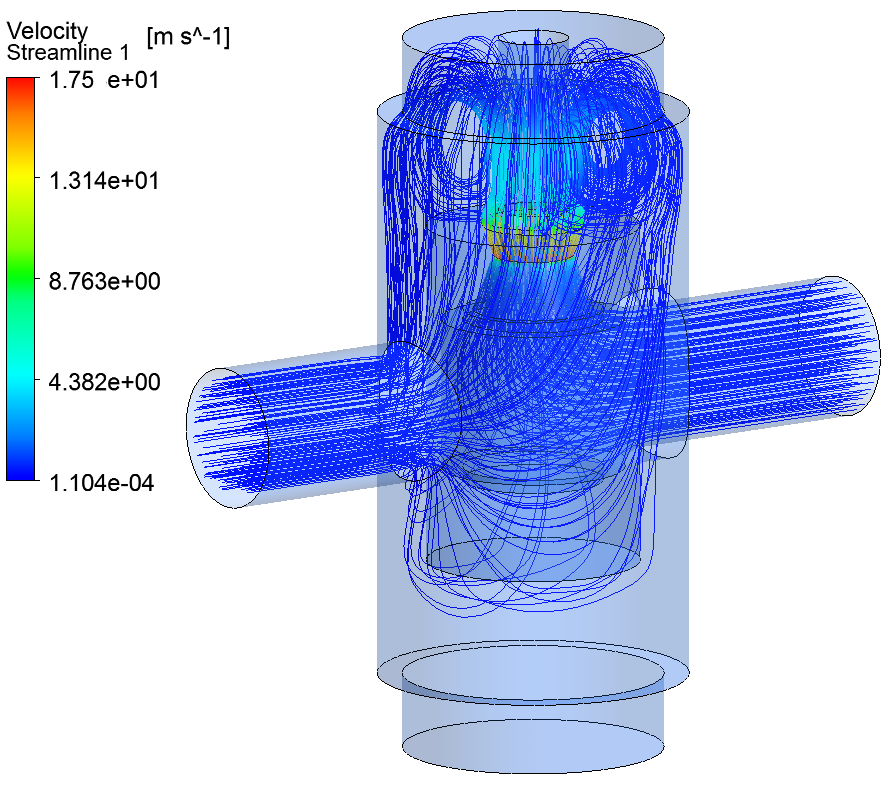
IIoT hot water system CFD fluid dynamics showing velocity streamlines and flow patterns, blue (low velocity) to red (high velocity) zones.
You're designing a smart irrigation valve, a microfluidic medical pump, or an air-to-water generator. In these devices, liquid or gas moves through internal channels, changes diameter, squeezes through tight gaps, or shifts direction. How fluids and gases behave in these conditions isn't always intuitive. You can't just look inside a closed pipe and watch water flow, or see how air changes direction inside a pump enclosure. But plenty can go wrong inside.
If channel geometry is wrong, water flow becomes turbulent. Turbulence creates an annoying whistle or hum. Channel resistance is high, so you need a powerful (and expensive) pump. In some spots, pressure spikes dangerously, and seals or tubes start leaking. You won't see these problems until you assemble a real prototype. And if you only discover them when a customer opens the box, the fix will be expensive.
Dyson built their entire reputation on aerodynamics. Their quiet vacuums and powerful bladeless fans are the result of CFD (computational fluid dynamics) simulations. They optimize channel geometry to maximize suction force at minimum motor power and noise. They don't build 10 prototypes and test each over weeks. They simulate. That's how they shipped a product quieter and more powerful than competitors, using less energy. Your unique selling point is efficiency? ("Uses 30% less energy" or "Runs 30% quieter.") You need CFD data to back it up. Marketing claims without engineering proof don't hold weight with investors.
Simulation shows you the exact velocity distribution across channels. It finds and eliminates turbulent zones that create whistle and hum, which is critical for consumer electronics and medical devices. A loud-running device makes users think something is broken. Often, achieving the right flow rate means choosing a powerful (and costly) pump. Simulation lets you reshape channels: widen them at critical points, add guide vanes, optimize inlet geometry – all to lower hydraulic resistance. This lets you use a smaller, more efficient, cheaper motor without sacrificing performance. If your device involves flowing liquids or gases, CFD modeling doesn't just make it work – it makes it competitive.
The Bottom Line
Without simulation, problems emerge late in prototyping. When you get your first physical prototype (vacuum-cast, CNC'd, or small-batch manufactured) and discover it overheats, clips break, or performance is erratic, you have two options:
Order a new prototype with geometry changes and repeat testing (2–3 iterations (might be even more), $10–15k extra)
Hire an engineer to diagnose the failure
Simulations give you visibility into how your device will behave before you order the first prototype. You catch problems on a digital model, where fixes take days – not weeks waiting for new tooling.
At EnCata, we integrate simulations into the design process in parallel with CAD work. Critical parameters (thermal behavior, strength, vibration characteristics, fluid dynamics) get checked at the CAD stage, before you spend on materials or equipment. This doesn't eliminate the need for physical testing, but it cuts the odds of critical manufacturing failures and speeds your path to market.
Your first hardware product is stressful enough. Simulation removes one major source of that stress: the uncertainty of whether your design will actually work when it hits the real world.
FAQ: Common Questions from Hardware Product Founders
Q: How much does hardware simulation cost for a startup?
A: Engineering bureau rates vary widely, so let's discuss this in terms of hours instead. For a wearable medical device, simulation can require 200-500 engineering hours because it must pass strict certification – every component touching skin must be proven safe.
For non-contact devices without safety-critical environmental impact (not for oil & gas, heavy industry, or similar), you might need 80-200 hours. This covers basic thermal analysis, drop test simulation, vibration checks.
For everything else, we calculate case-by-case.
Q: Can I skip simulation if I'm only making 1,000 units?
A: Scale doesn't matter – risk does. Even with 1,000 units, one critical defect discovered after production can wipe out your entire margin.
If your device requires regulatory approval (medical, high-voltage, pressure-rated), simulation is mandatory. Regulators don't care about production volume; they care about safety proof.
If you're bootstrapped, simulation is still cheaper than iterating through physical prototypes (You might just be one of the lucky ones who gets away with it, and everything will be fine). A single injection mold redesign might cost $20–50k and delay launch 6–8 weeks. Simulation prevents both.
Q: What's the fastest simulation to run?
A: That's the wrong question, and it tells us you might not need simulation yet)
Simulations don't compete on speed. They're not even in the same category. You don't choose between thermal, vibration, and FEA based on which runs quickest. You choose based on what your product needs to prove.
Asking "what's fastest" is like asking "what's the fastest medical test?" It depends on what you're diagnosing. A blood test is faster than an MRI, but they answer different questions.
The real question: What risks does your product face? That determines which simulations you actually need, not how fast they run.
If you're trying to optimize for speed over accuracy, that's a red flag. Simulation done wrong is worse than no simulation.
Q: Do I need simulation if I'm using a contract manufacturer?
A: Yes. Your CM will expect you to provide validated designs. Simulation data proves your design is sound before they quote tooling.
Fresh, cool, new insights from EnCata in engineering every month
Thank you! Your submission has been received!
Oops! Something went wrong while submitting the form.
Learn more from our insigths
Product Development
Engineering
10 things we usually redo in startups’ CAD models before manufacturing
Learn the 10 most common product design mistakes that threaten manufacturability. This article is brought to you by EnCata’s Business Development specialist Pavel Avramenko.
Product Development
Industrial Design: The Importance of Client-Contractor Collaboration
Oleg Kadolka, our industrial designer, explains the nuances of his job and shares his personal experience at EnCata – a service company that specializes in design development and industrial prototyping for hardware and deep-tech startups. This interview is brought to you by EnCata’s content manager Vera Vasilevskaya.
Hardware
Product Development
Key Differences in Managing Software vs. Hardware Projects
Our marketing specialist Vadzim Krasnouski conducts an interview with 6 project managers from software and hardware, and compares their functionalities. Read on to learn more about the topic.
Have a project to do?
Fill out the form and a member from our sales team will get back to you
Thank you! Your request has been submitted! We shall contact you shortly
Oops! Something went wrong... Try to reload this page and resubmit
FAQ
At EnCata, what kinds of contracts do you use? Is it a fixed-term or an agile contract?
Can you provide me with a certification of competence?
What level of training do your specialists have?
Is it possible for us to cooperate with EnCata’s team?
Is it possible to discuss the project with your technical team?
Can EnCata facilitate mass production?
Do you sign NDAs?
Patent or Develop first?
Does EnCata outsource electronics services?
Do you write program code, either software or firmware?
Are there hardware engineers in your team?
What should I do now that I've approached you with my project idea?



.gif)


%201%20(1).jpg)
.jpg)
.jpg)


